Start with the Pace customer
Salespeople work from the Customers and Prospects assigned to their exact Pace SalesPerson mapping. Managers can review the authorized Division.
Benefit: less duplicate customer maintenance and clearer ownership.
Model Output CRM for Pace
Model Output turns synchronized Pace Customers, Estimates, Jobs, and Invoices into a focused sales workspace for Leads, Opportunities, follow-ups, forecasting, customer-retention signals, and manager reporting—without the weight of a sprawling enterprise CRM.
Purpose-built for Pace
Your Pace data already identifies the customer, salesperson, Estimate, Job, price, and posted sale. Model Output adds the qualification, follow-up, forecasting, and retention workflow around it.
Salespeople work from the Customers and Prospects assigned to their exact Pace SalesPerson mapping. Managers can review the authorized Division.
Benefit: less duplicate customer maintenance and clearer ownership.
Link more than one Estimate to an Opportunity and select the Estimate, Product, Part, and quantity options that represent the expected sale.
Benefit: pipeline reflects the work your estimating team is actually quoting.
Use Leads, Opportunities, activities, reminders, workflows, customer trends, and manager reporting without adopting unrelated enterprise CRM modules.
Benefit: a smaller learning curve and a workspace built for everyday sales follow-up.
Product pictures
Explore customer health, Lead assignment, Opportunities, Pace pricing, activities, notifications, reporting, and manager workflows. Select any large picture to open its full-size view.
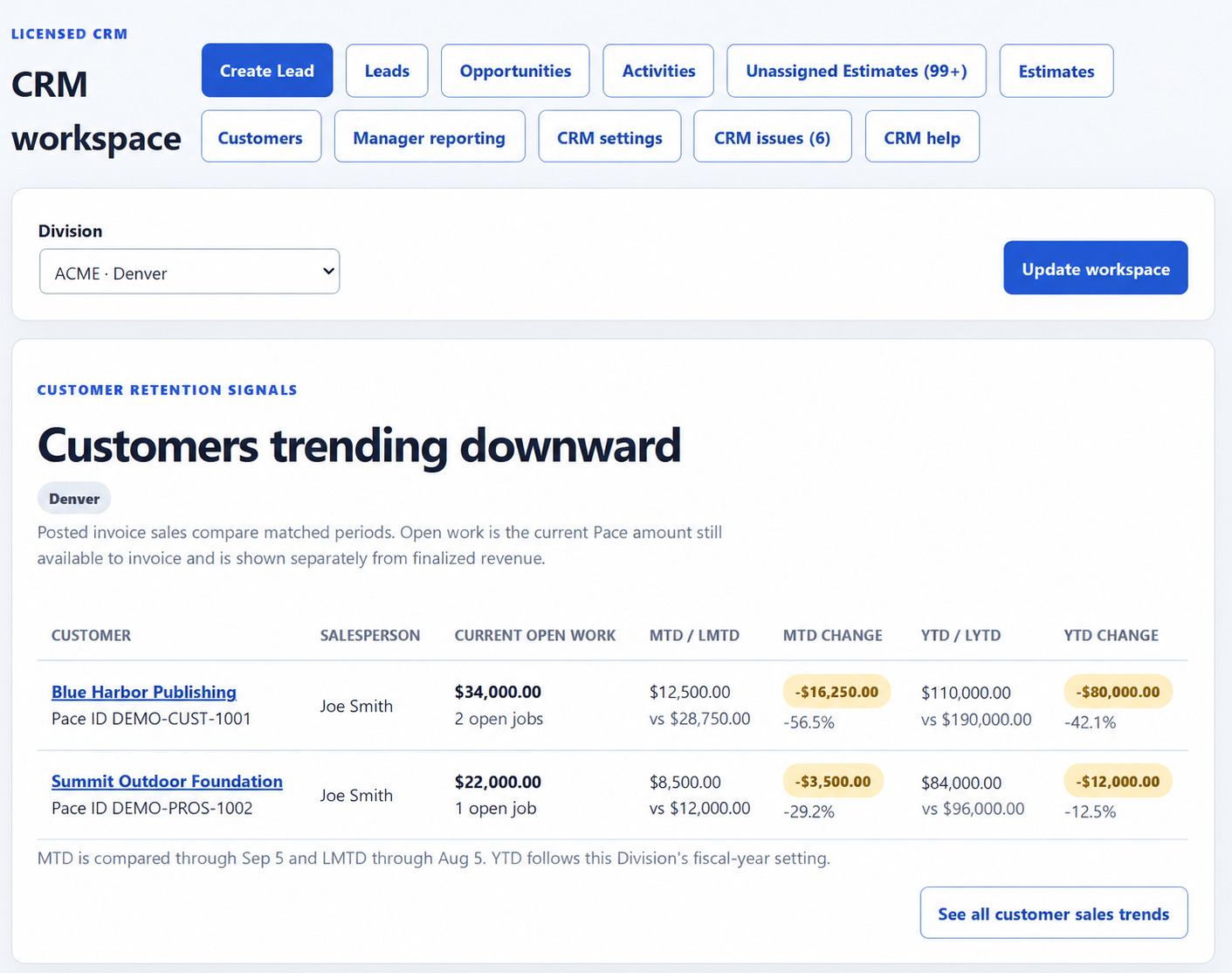
Spot the customers losing momentum first, compare matched sales periods, and see current open work without mixing it into finalized revenue.
01Customer retention signals
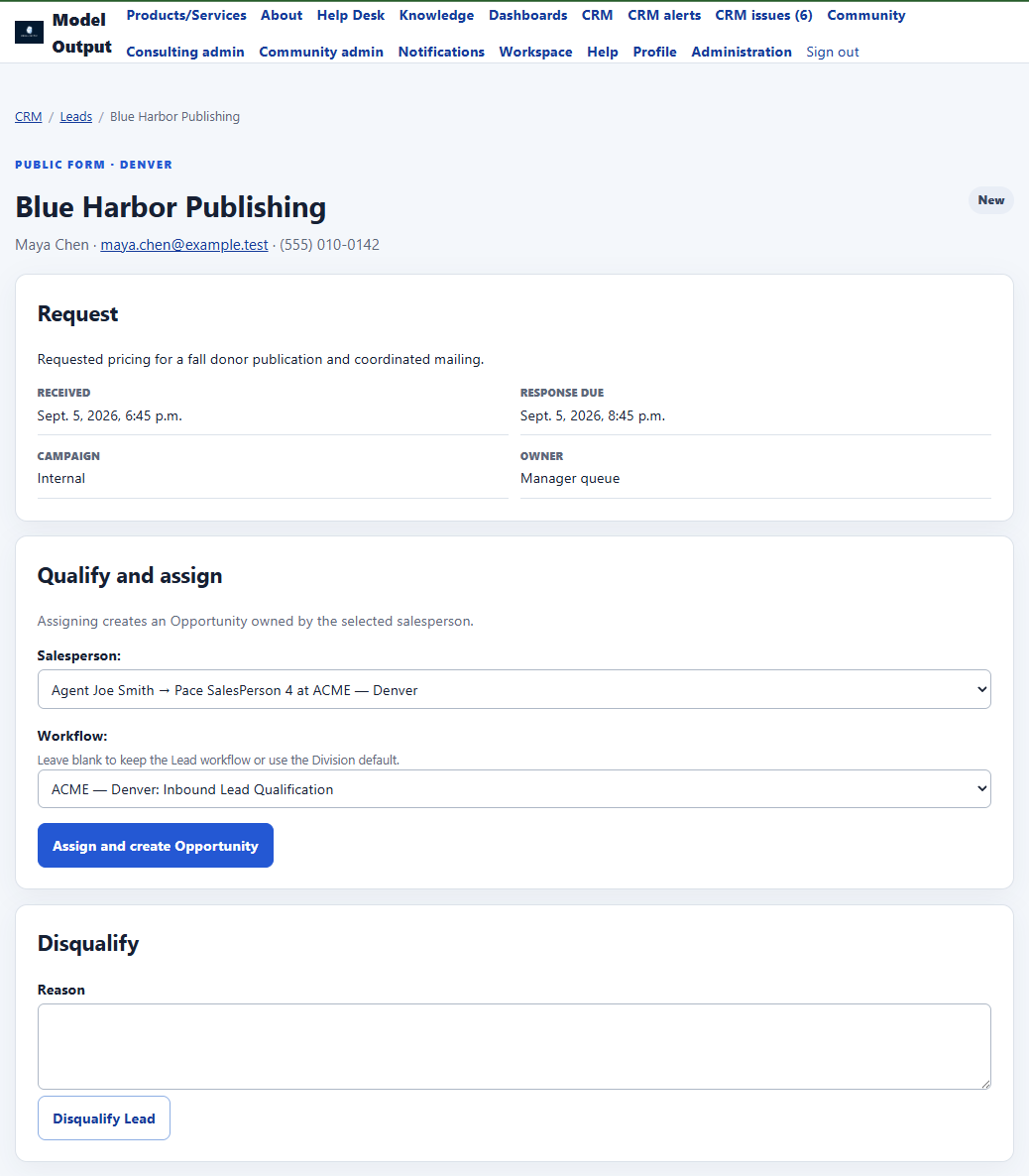 02Lead qualification and assignment
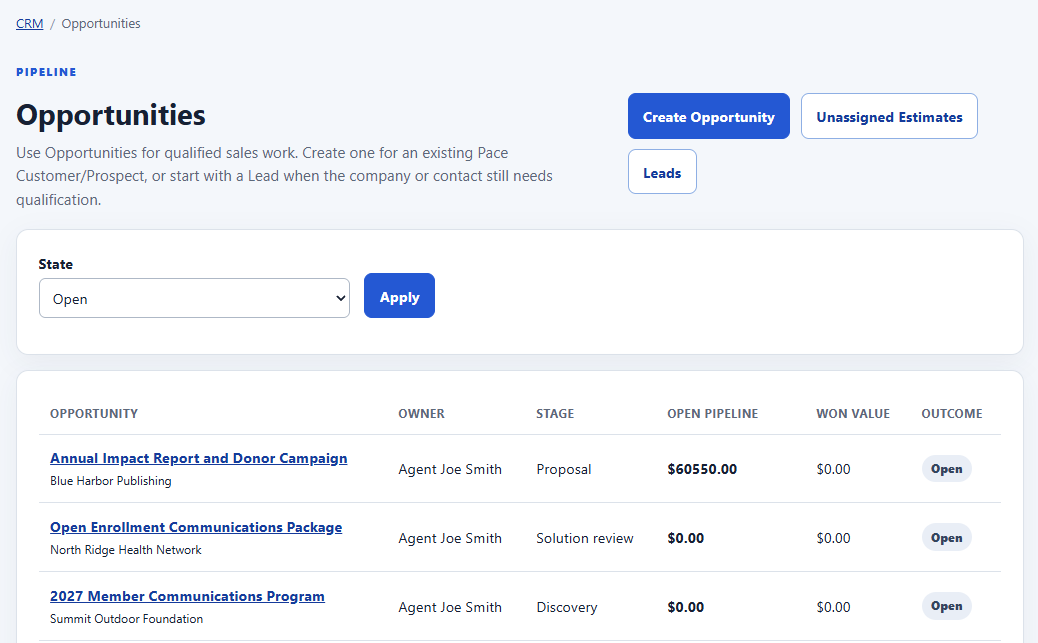 03Focused Opportunity pipeline
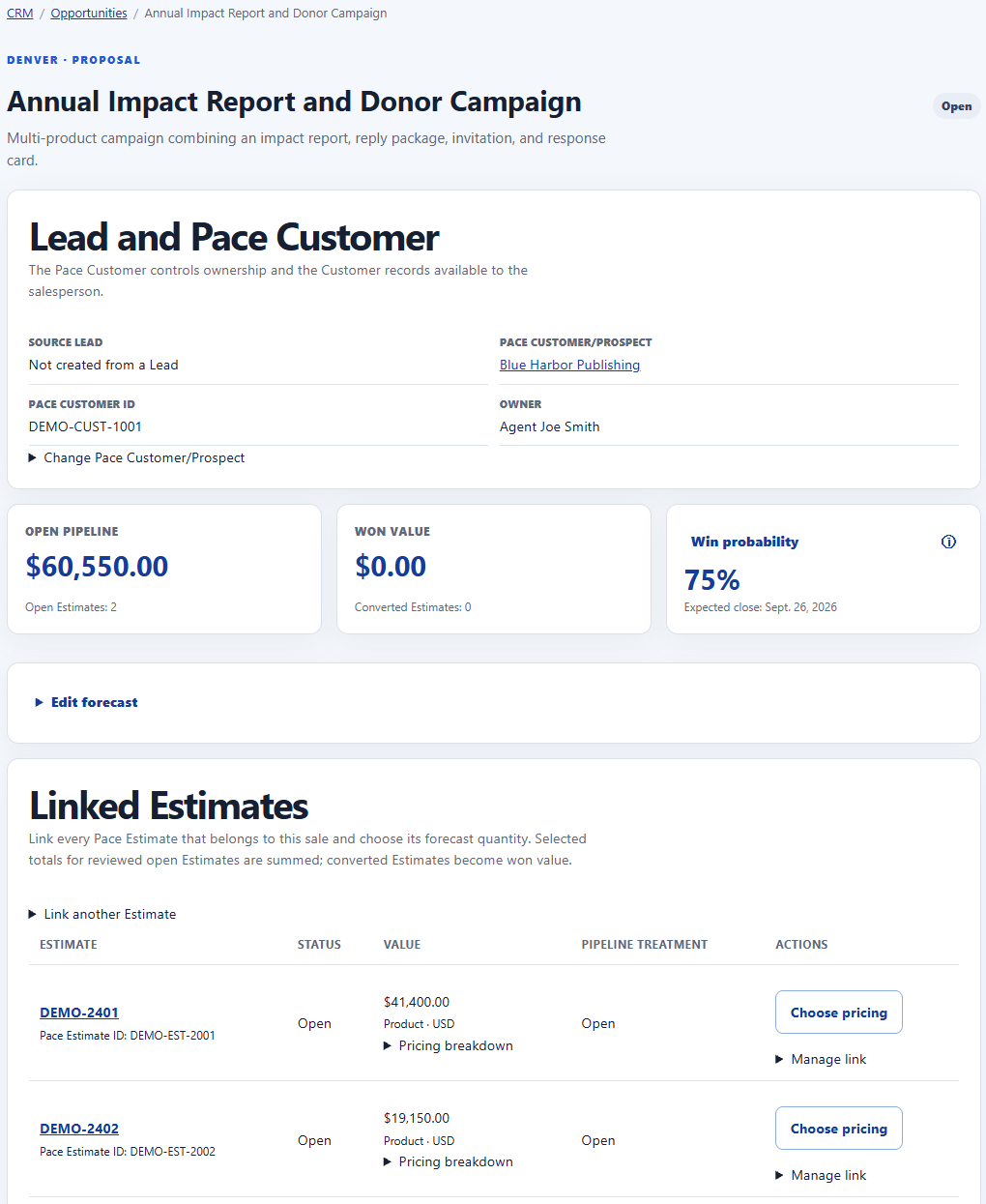 04Multi-Estimate Opportunity
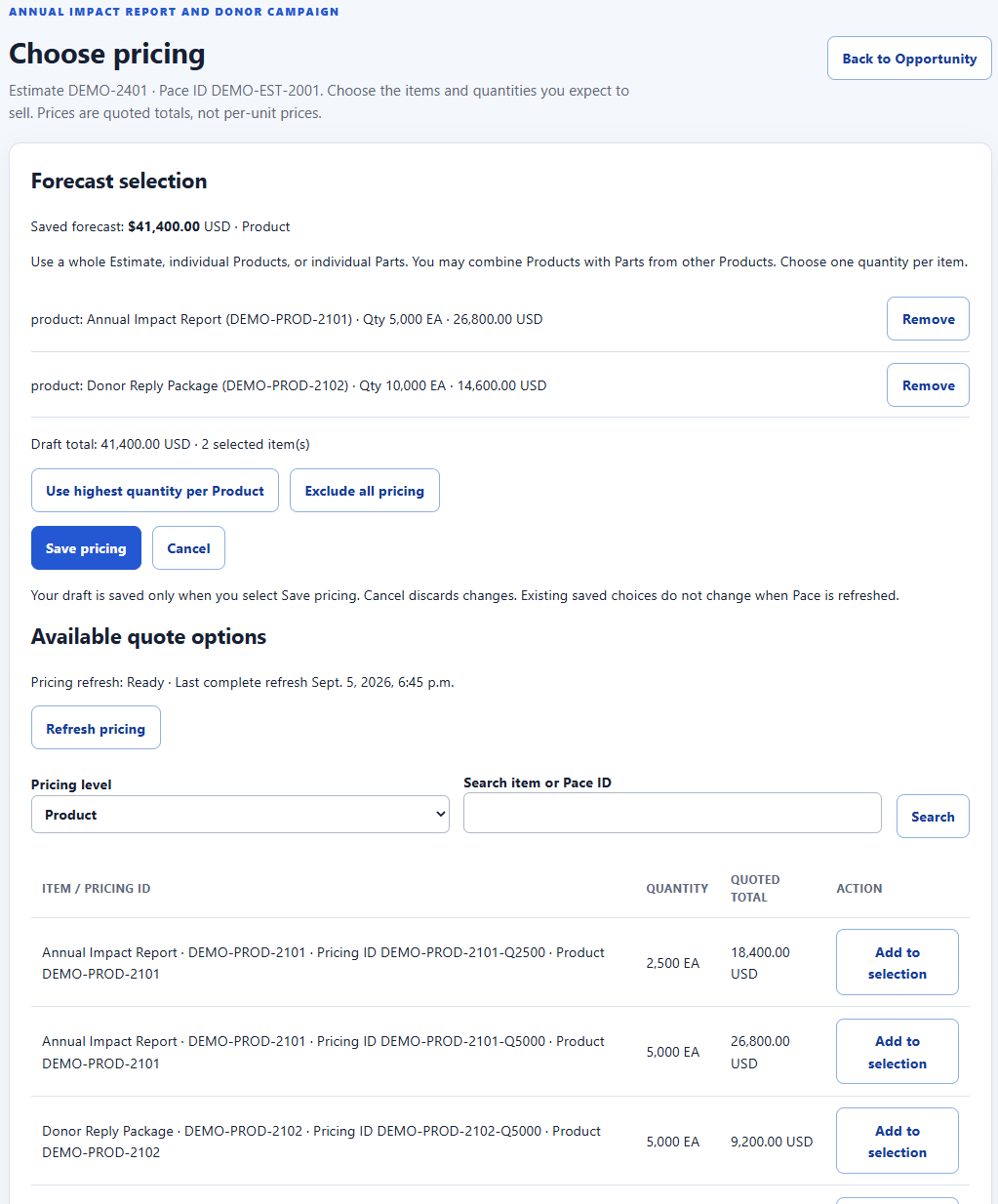 05Pace-aware forecast pricing
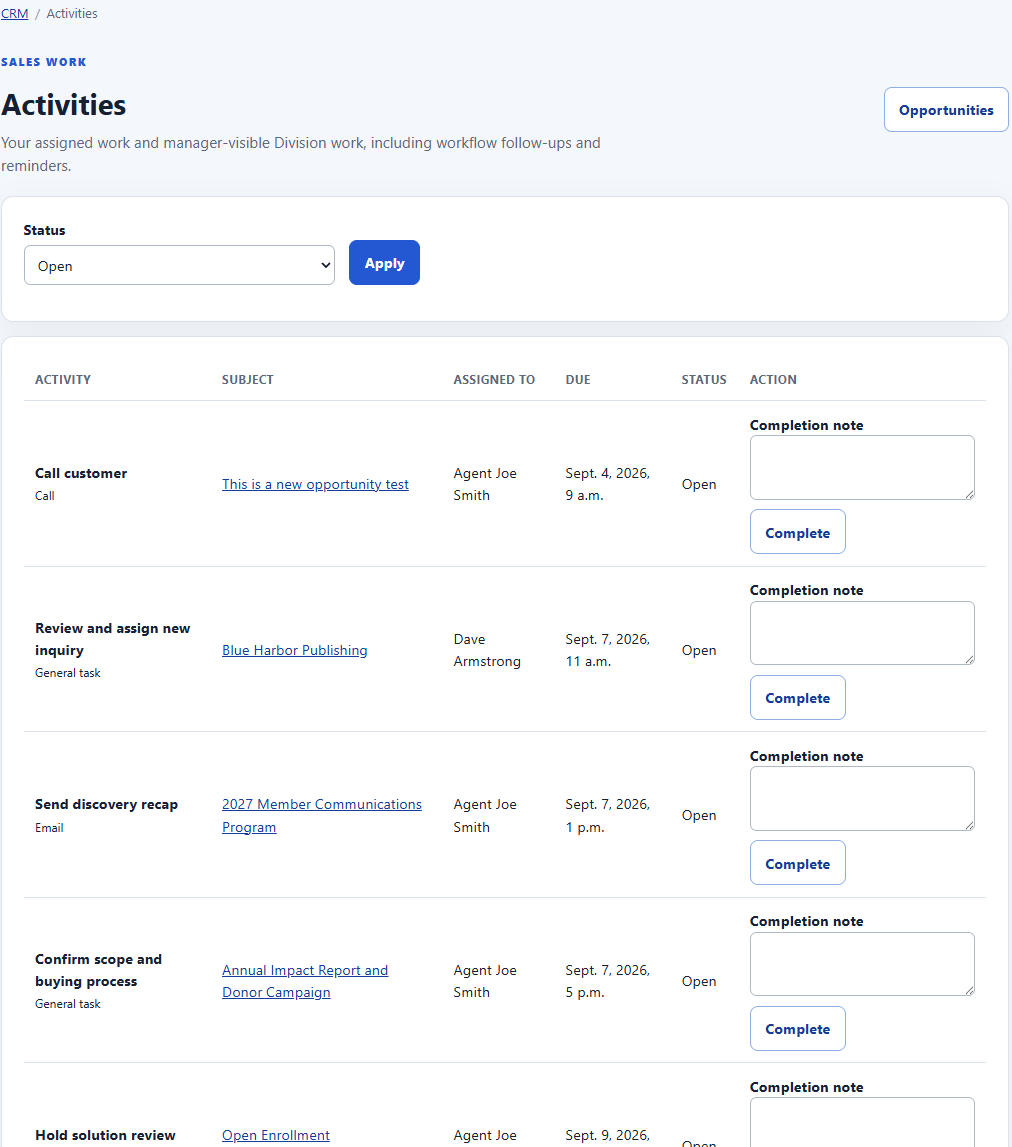 06Sales activities and follow-ups
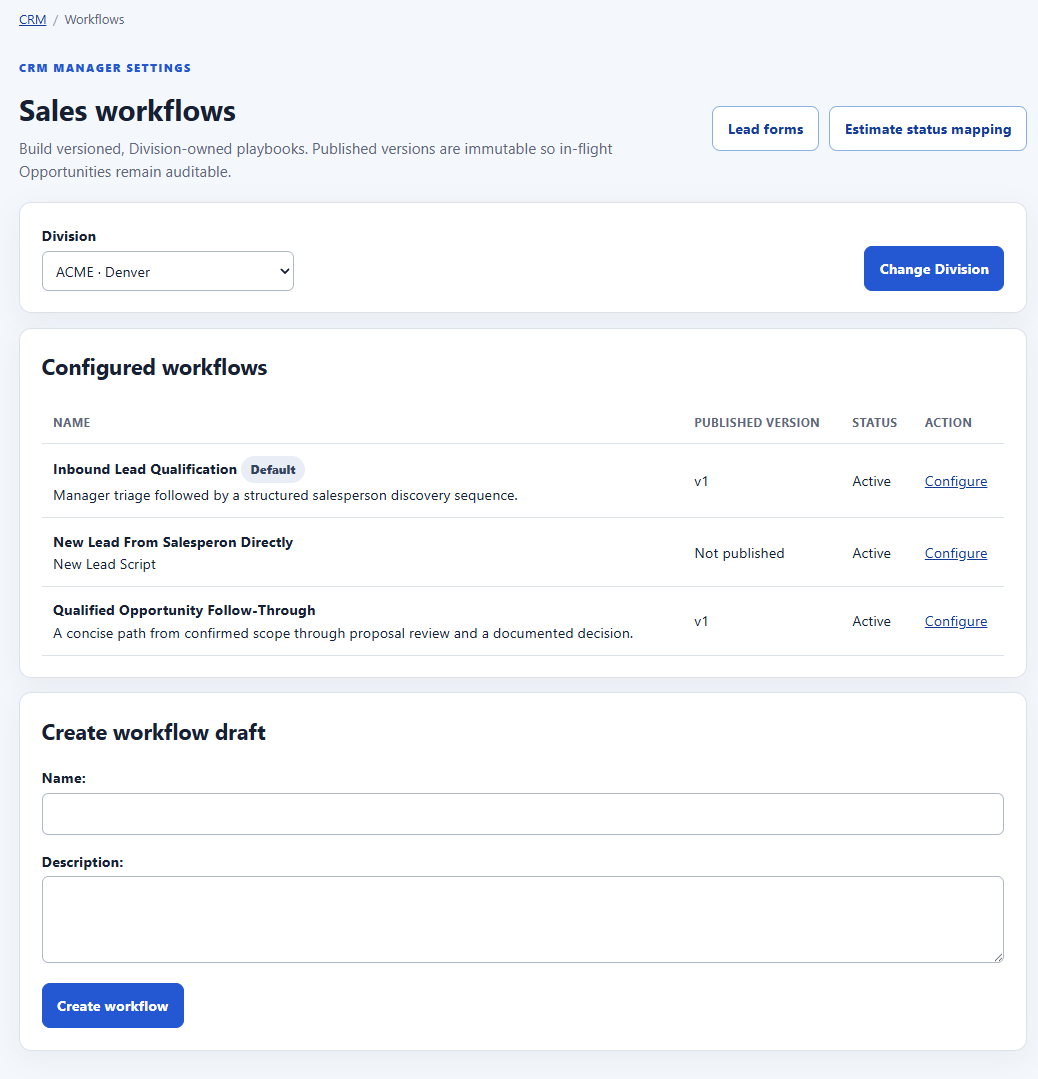 07Division-owned sales workflows
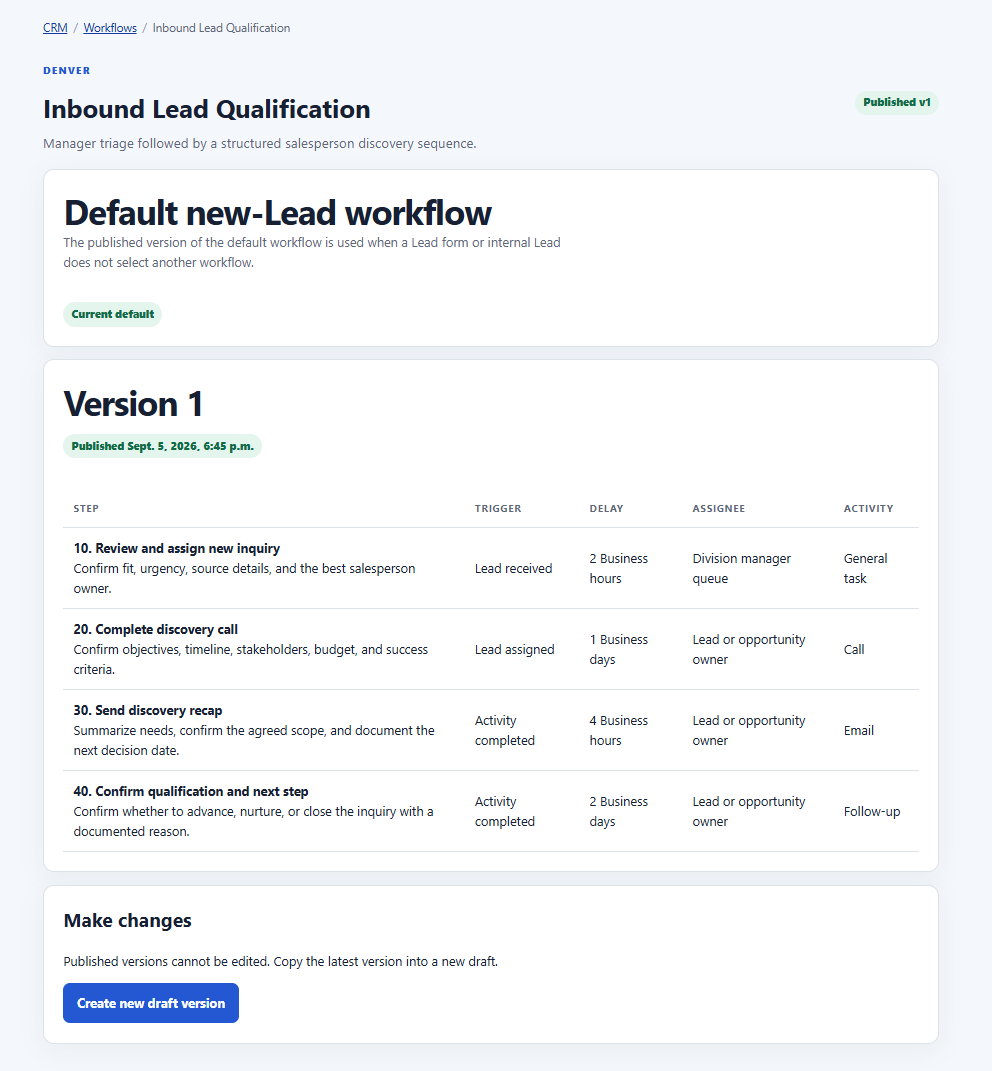 08Versioned workflow steps
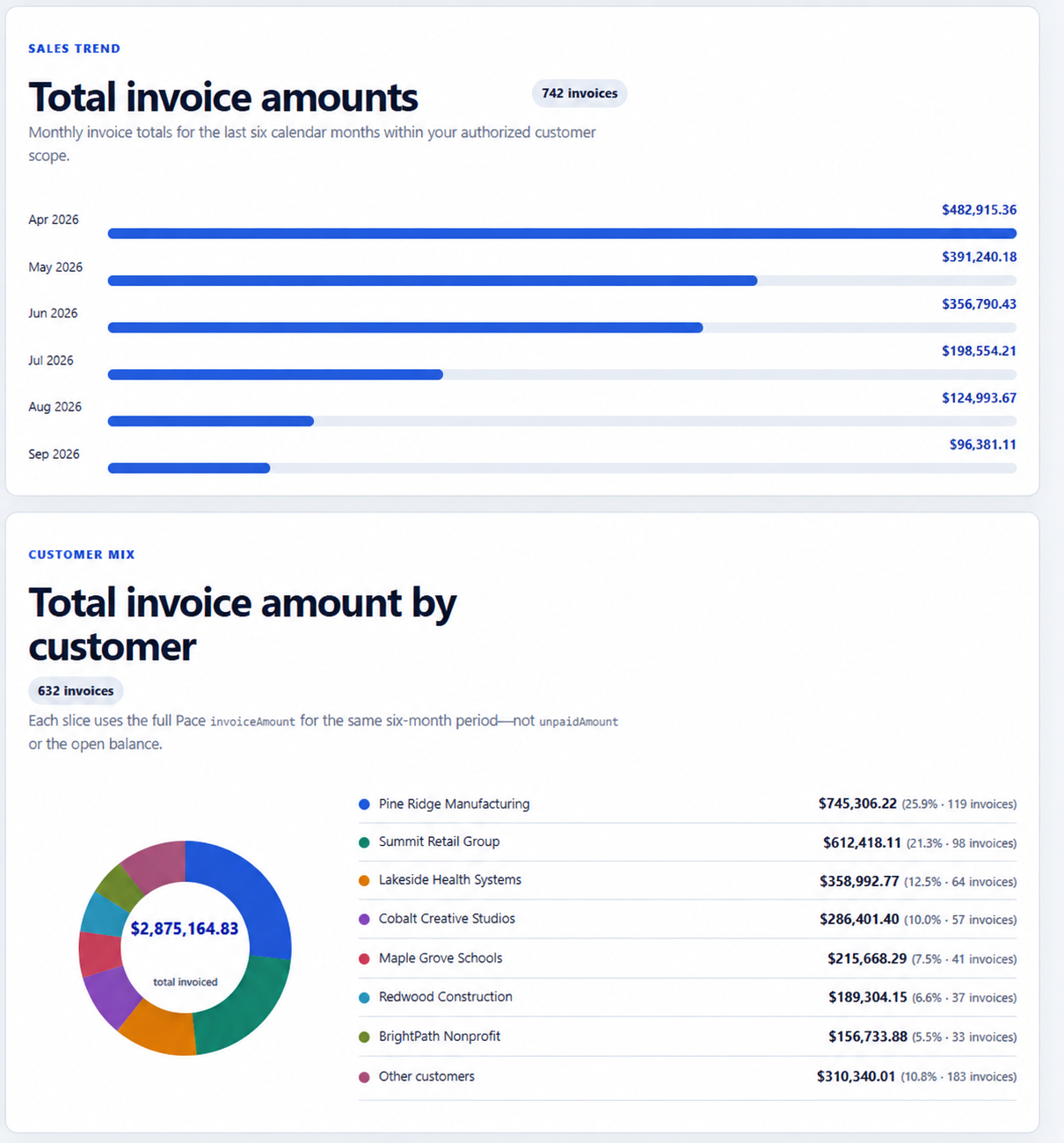 09Invoice and customer sales insight
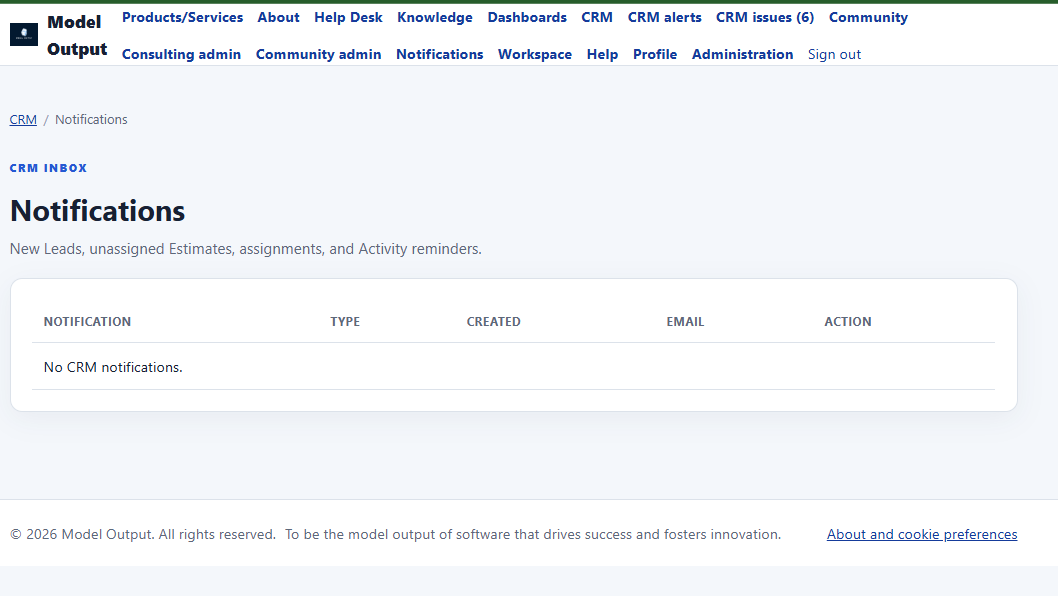 10A practical CRM inbox
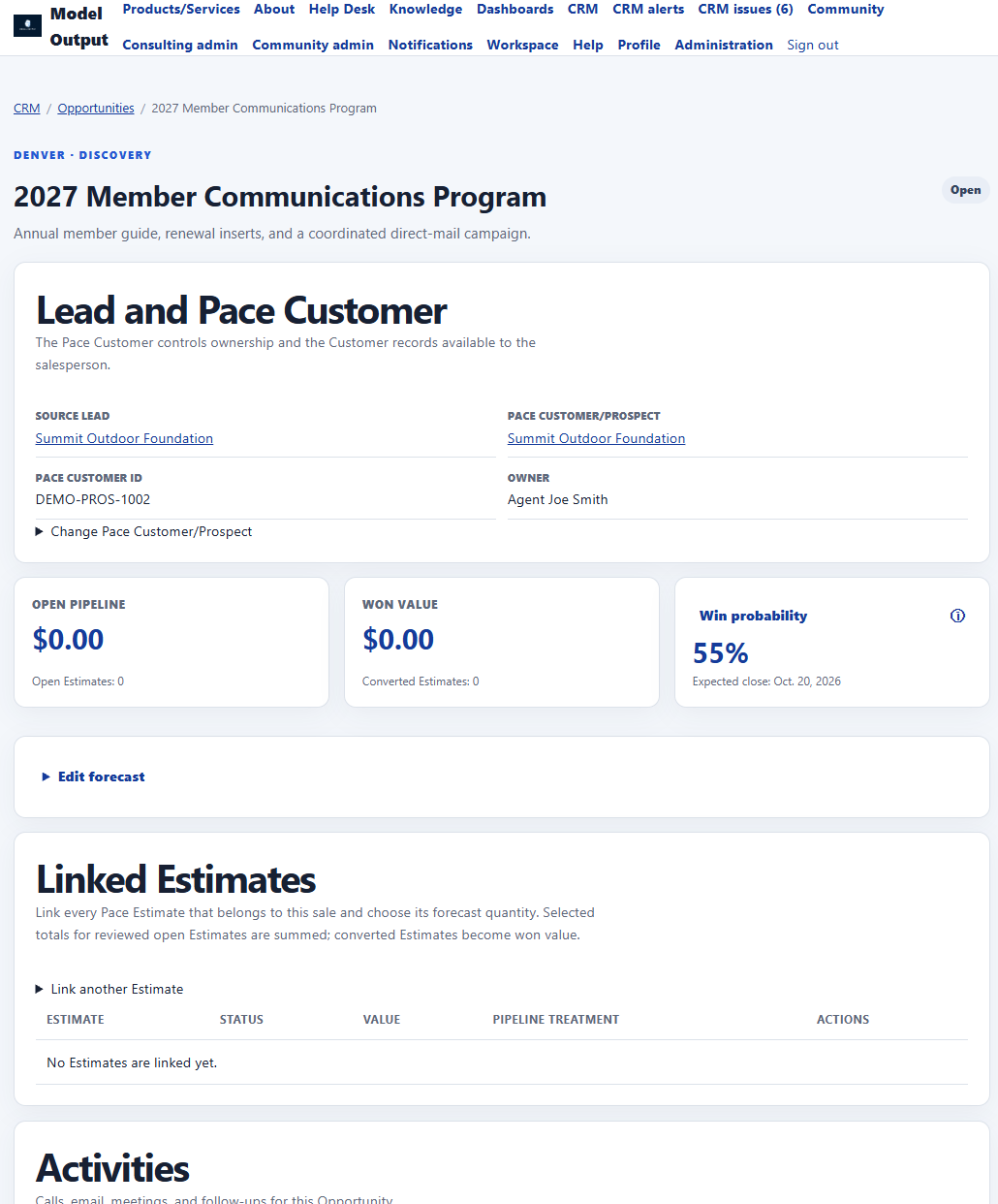 11Opportunity foundation
Screenshots contain illustrative demo data. Use Previous and Next, select a thumbnail, or press the left and right arrow keys.
CRM capabilities
A practical set of connected tools for salespeople and their managers, with company and Division boundaries enforced throughout.
Capture a Lead in the application or through a hosted, rate-limited website form with consent, source, campaign, response target, and manager review.
Managers can assign a Lead to an eligible Pace salesperson, choose the follow-up workflow, or disqualify it with a recorded reason.
Start qualified work directly against an existing Pace Customer or Prospect, or let Lead assignment create the Opportunity.
Group every relevant Pace Estimate under one sale. Eligible open selections count toward pipeline; converted Estimates become won value; partial wins remain visible.
Choose whole-Estimate, Product, or Part values at the quantities expected to sell. Saved selections remain reviewable and never alter Pace pricing.
Let the Opportunity owner maintain win probability and expected close date while synchronized Estimate outcomes govern open and won values.
Track calls, emails, meetings, tasks, follow-ups, due dates, assignees, and bounded completion notes from one actionable list.
Managers publish sequenced Lead and Opportunity playbooks with business-time delays. In-flight work keeps the version that created it.
Surface eligible synchronized Pace Estimates that are not linked to an Opportunity, with salesperson access, manager aging review, and in-app alerts.
Rank customers whose posted Invoice sales are down for matched MTD/LMTD or fiscal YTD/LYTD periods, with current open Job value shown separately.
Review Division and salesperson sales periods, Pace annual quota, Model Output goals, customer mix, and retained Invoice history.
Optionally let authorized mapped reps submit a Prospect Customer and Contacts through a reviewed background process with duplicate-safe issue handling.
Give managers and Model Output staff one searchable place to review connection, synchronization, write, customer-reference, and retention exceptions.
Salespeople see their mapped Pace Customers and work; managers see the authorized Division. Named seats, memberships, roles, and permissions all apply.
Connected sales workflow
Create a Lead internally or receive one from the hosted web form. A manager assigns the right mapped salesperson and follow-up workflow.
Select an existing authorized Pace Customer or Prospect. If enabled and appropriate, an authorized rep can submit a controlled new Prospect and Contact request.
Link the Pace Estimates that belong to the sale, choose the expected Products, Parts, and quantities, and maintain probability and expected close.
Activities, workflow steps, due dates, unassigned Estimate alerts, and manager views keep the next action visible.
Use posted Invoice history and current open work to identify slowing customers early and give the salesperson a reason to reconnect.
Straightforward pricing
One plan includes the current Pace-connected CRM capabilities instead of splitting everyday sales work across feature tiers.
$299per Pace-connected Division/month
Includes up to 10 named sales reps, plus manager reporting and administration.
Leads, Opportunities, activities, workflows, pipeline, customer trends, and reporting included
Get startedCall for a quotelarger teams or multiple Divisions
Talk with Model Output about more than 10 sales reps, additional Pace-connected Divisions, custom workflows, and integration needs.
Pricing is tailored to the rollout
Request a quoteAnnual billing: pay for 11 months and receive 12 months of service. Pace connection review, onboarding, data preparation, custom integration work, and consulting are quoted separately.
Secure foundation
Model Output combines named CRM seats with explicit company membership, Division scope, roles, permissions, and exact Pace SalesPerson mappings.
Salespeople see active Pace Customers and sales work assigned to their exact mapping.
Authorized managers review their Division without giving every salesperson the same reach.
Pre-provisioned users may authenticate through a compatible company identity provider.
Record access is enforced by the application, not by hiding links or relying on browser filters.
Important assignment, forecast, configuration, and reconciliation changes create useful history.
Division settings define retained CRM history while actionable open work remains protected.
Questions and answers
Model Output CRM is a focused sales workspace built specifically for companies using Pace. It connects Leads, Opportunities, activities, Pace Customers, Estimates, Jobs, and posted Invoice history without the administrative weight of a broad enterprise CRM.
No. Pace remains authoritative for operational Customers, Estimates, Jobs, pricing, and Invoices. Model Output adds the salesperson and manager workflow around that data, including qualification, follow-up, pipeline, customer-retention signals, and reporting.
A rep can link multiple eligible Pace Estimates to one Opportunity and select the Estimate, Product, or Part quantities expected to sell. Open pipeline sums the saved selections from eligible open Estimates; converted Estimates become won value, while lost or cancelled work is excluded.
Yes. Customer retention signals compare finalized posted Invoice sales for matched MTD and LMTD periods and fiscal YTD and LYTD periods. Current open Job amount-to-invoice is shown separately so unfinished work is not counted as completed revenue.
When an administrator enables the reviewed Pace write workflow, authorized mapped salespeople can submit a Prospect Customer and related Contacts. Other synchronized operational and financial records remain read-only in Model Output.
Yes. Managers can review and assign inbound Leads, configure versioned Division workflows, map Pace Estimate statuses, review aging unassigned Estimates, set sales goals, and view salesperson or Division reporting.
No. A salesperson sees the active Pace Customers and sales work belonging to that salesperson's exact Division mapping. Authorized CRM managers may view the wider Division.
Model Output CRM is $299 per month for one Pace-connected Division and up to 10 sales reps. Larger teams, additional Divisions, onboarding, and custom integration work are quoted separately.
Ready to simplify sales follow-up?